Related Posts Plugin for WordPress, Blogger...

About

Follow Us

Showing posts with label Client Side Validations. Show all posts

Monday, 13 July 2015

Introduction: 
In this article I will explain different type of validations in asp.net. Asp.Net provides some validation controls to validate data.
Validations controls in Asp.Net

A.      RequiredFieldValidator
B.      RangeValidator
C.      CompareValidator
D.     RegularExpressionValidator
E.      CustomValidator
F.      ValidationSummary

1.     Required Field Validator: Required field validator is used to when we want to check whether control is empty or not. It ensures that the control is empty or not. We generally validate textbox with this control. We can also validate dropdownlist control.
Syntax to validate TextBox using Requiredfieldvalidator:
<asp:RequiredFieldValidator ID="RequiredFieldValidator1" runat="server" ErrorMessage="Enter Name" ControlToValidate="txtName">*</asp:RequiredFieldValidator>

2.            RangeValidator Control
The RangeValidator control verifies that the input value falls within a predetermined range.
Syntax for Range validator:
  <asp:RangeValidator ID="rvValue" runat="server" ControlToValidate="txtValue"
   ErrorMessage="Enter Value between (10 - 20)" MaximumValue="20"
   MinimumValue="10" Type="Integer">

3.     CompareValidator Control
The CompareValidator control compares a value in one control with a fixed value or a value in another control.
Syntax  CompareValidator Control:
       <asp:CompareValidator ID="CompareValidator1" runat="server"
            ErrorMessage="CompareValidator" ControlToCompare="txtConfirmPassword"
            ControlToValidate="txtName"></asp:CompareValidator>

4.     RegularExpressionValidator
The RegularExpressionValidator is used in case of validating the input text by matching against a pattern of a regular expression. The regular expression is set in the ValidationExpression property.
We can use other regular expression to validate data which are not listed in ValidationExpression property.
Syntax for regular expressions:
<asp:RegularExpressionValidator
                ID="RegularExpressionValidator1" runat="server"
            ErrorMessage="Enter Valid Email" ControlToValidate="txtEmail"
            ValidationExpression="\w+([-+.']\w+)*@\w+([-.]\w+)*\.\w+([-.]\w+)*"></asp:RegularExpressionValidator>

5.     CustomValidator:
The CustomValidator control is used to write custom validation for both the client side and the server side validation.
For client side validation we use ClientValidationFunction property. For server side we use onservervalidate property. We call function created on server side.
Syntax For custom Validator:
<asp:CustomValidator runat="server" id="customname" controltovalidate="txtName" onservervalidate="function_name" errormessage="The text must be exactly 10 characters long!" />


6.     Validation Summary: Validation summary is not used to validate controls. It is used to show all error messages in one place.

Tuesday, 3 March 2015

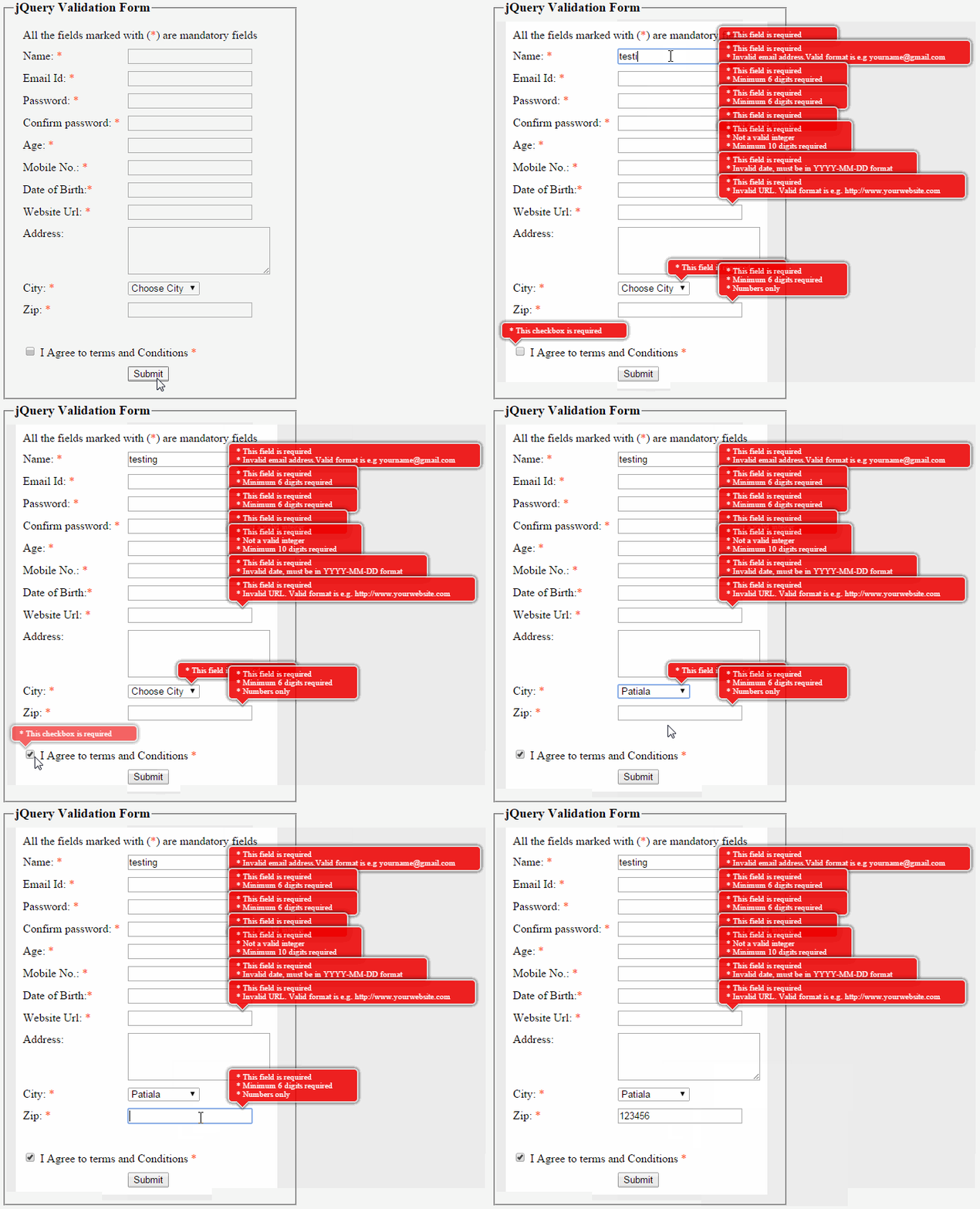
In this article I will explain how to implement stylish jQuery form validation in asp.net with example. If any input field is empty or data is not valid in that field then a stylish message box will pop up with the appropriate message as shown in image.


Thursday, 12 February 2015

Introduction: 

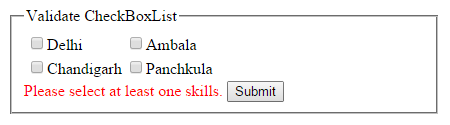
In this article we will learn how to validate CheckBoxList control i.e. to ensure at least one item is selected in the CheckBoxList. It can be done in many ways but I’ll use CustomValidator control andJavaScript to validate.

Thursday, 5 February 2015

Introduction:  Read or get DataKeyName from GridView on SelectedindexChanging event of GridView in asp.net in both the C#.Net and VB.Net languages.


Description: Suppose you have a GridView grdEmp having DataKeyNames empid and you want to read empid  from DataKeyNames in Gridview’s SelectedIndexChanging Event then follow the code given below:

Introduction: Validate the file extension before uploading or restrict the user to upload only specific type of files though FileUpload control using javascript and customvalidator validation control.


Description: Sometimes it is required to validate the file extension before uploading file i.e.If you want the user can upload only jpg, jpeg, png, gif, doc, docx, xls, xlsx files then you have to check the extension of the file the user is going to upload.

Introduction: 

In this article I will explain how to validate form data using JavaScript validation in asp.net.  I have tried to cover all the type of fields to validate.
Description: It is very important to valid data before submit it to database.  ASP.NET provides a set of validation controls that provide an easy-to-use and powerful way to check for errors. Similarly we can also create functions

Wednesday, 4 February 2015

Introduction
In this article we will learn how to restrict users to upload the files of specific type through FileUpload control by validating through RegularExpressionValidator validation control.

Description: 
Sometimes it is required to validate the file extension before uploading the  file i.e. you want that user can upload only the files of specific extension e.g. if you want the user can upload only Word  and Excel  files(.doc, .docx, .xls, .xlsx ) then you have to check the extension of the file the user is going to upload. Similarly if you want only images of the type (.png, .jpg, .jpeg, .bmp or.gif) can be uploaded then it is also possible.